
Yes, you can turn a website you made with ChatGPT into a real, editable site — get the page to a URL and it comes back as an editable, hosted site — and from there Outlyne works as your conversion coach, suggesting changes that turn more visitors into inquiries and making them for you once you give the go-ahead. ChatGPT has closed part of the old gap, since most paid plans can now publish a page with ChatGPT Sites, but every edit still runs through the chat, so this guide covers what ChatGPT gives you today, why that is hard to live with, and how to end up with a site you can edit and grow.
Can you turn a ChatGPT-made website into a real site?
Yes, and you do not have to start over to do it. If the page ChatGPT built for you is reachable at a URL, whether that is a ChatGPT Site you published, code you dropped on a quick host, or a preview link, Outlyne reads that page the way a browser does and rebuilds it as a new, editable site. You paste the URL and your layout and copy stream in as sections.
Get the page to a URL first
The one prerequisite is that the page has to be reachable at an address. If you published it with ChatGPT Sites, you already have one: use the Site’s URL. If ChatGPT handed you a block of HTML in the chat, drop it on any static host so it has an address. And if you built the page in canvas back when ChatGPT still opened one, that preview was a sandbox, not a public URL, so copy the code out and host it the same way.
What ChatGPT actually handed you
Either way, be clear about what ChatGPT gave you. It produced a design and the code to render it, and possibly a live page, which is a fast way to a first draft. It did not give you a site built for editing: every change still runs through the chat. That second half is the work, and it is the half this guide is about.
What do you actually get from ChatGPT today?
More than you used to, so it is worth being precise about where things stand in 2026.
The code lives in the chat now
Ask ChatGPT for a webpage and it writes the HTML, CSS, and JavaScript into a code block in the chat. If you remember canvas, the side panel that could render an HTML or React preview, OpenAI removed it from the current models in May 2026: writing and coding now happen directly in chat responses through writing blocks and code blocks, and canvas survives only on legacy models until those sunset. What you get is still a snapshot, one page produced in one shot from your prompt.
ChatGPT can publish now, with caveats
The stock advice that ChatGPT cannot put a page online is out of date. ChatGPT Sites, in public beta since July 2026, lets you build a page in ChatGPT’s Work view, preview it, and publish it at a URL anyone can visit. The caveats matter, though. Sites is not available on the Free or Go plans, it is not available in the EEA, Switzerland, or the UK at launch, and beta usage limits mean a busy public Site can be pulled offline until usage drops. OpenAI pitches it at dashboards, project trackers, prototypes, internal portals, and reports, which tells you what it is built for.
What is still missing
Hosted or not, the page is not structured for editing, so changing the headline means asking the chat and shipping a whole new version. It is not set up to be found, so Google has no reason to know it exists. And a beta surface OpenAI is still reshaping is a shaky foundation for the site your business runs on. A prototype answers can this look good; a website answers can I run this next year.
Why is AI-generated website code hard to maintain?
This is the part people learn the hard way.
Every edit is a round trip
A pile of AI-generated code looks finished, but it is a one-off. The moment you want to change something, you are back in the chat asking for an edit, pasting the result, and hoping it did not quietly break the header or the spacing three sections down. The longer the conversation runs, the more ChatGPT loses track of earlier decisions, so a later edit can undo an earlier one.
Publishing does not fix editing
ChatGPT Sites changes where the page lives, not how you change it. You edit a Site by describing the change in the chat, reviewing a preview, and deploying again, and every deployment URL is a production URL, so an unreviewed change goes straight to the live page. That is the same round trip, with hosting attached.
Pages drift apart
Add a second page and the two drift, because each was generated separately with its own copy of the styles. Come back in a month and you are re-learning your own code before you can change a phone number.
AI code generators optimize for the first version. The cost shows up on every version after it.
That is the difference between generating a page and owning a website. A generator hands you output to maintain. What you actually want is a site you can change by describing the change, where editing one part does not put the rest at risk.
How does Outlyne turn the page into an editable site?
Outlyne reads your page and rebuilds it as a set of named sections that the system understands: a hero, a features block, testimonials, a contact section, and so on. You watch them land in the editor as it works.
From a page to named sections
Instead of a single file of markup, you get your design back as discrete, typed sections. The system knows what each one is, which is what makes everything after the import easier. And instead of whatever styling the code shipped with, the look becomes a custom design system you have full control over, so a restyle is a system change, not a find-and-replace through markup.
Edit by describing, like you prompted
Because Outlyne knows a hero is a hero and a testimonial is a testimonial, editing is a normal act in the app, styling stays consistent across the whole site, and improvements to a section type roll out everywhere they are used. You change things by describing what you want, the way you prompted ChatGPT in the first place, except the change lands in a structured section instead of a fresh block of code to paste. From there, Outlyne’s AI coaches your pages toward more inquiries, suggesting what to improve and applying it with your go-ahead. You keep the speed of AI, without the maintenance bill.
How do you turn it into a real, hosted website?
Three things turn a page into a website, and none of them require touching code.
Hosting, a domain, and real editing
- Hosting you can rely on. The site has to live somewhere people can reach, and not on terms a beta sets for you. Rebuilt in Outlyne, it is hosted for you, so there is no server to set up.
- A domain. Point your own domain at it so the address is yours, not a link a platform generated for you. The steps are in the custom domain guide.
- Editing you will actually do. Because the site is sections, changing copy, swapping an image, or adding a page is a normal edit, which means the site keeps improving instead of freezing at version one.
That is the whole difference between a good-looking prototype and a site you run.
How do you set up SEO for a brand-new site?
A site ChatGPT made is usually brand new, so you are not protecting old rankings; you are setting up SEO from zero so the page can be found at all.
Building rankings from zero
A fresh site has no history with Google, so the goal is to give it every signal it needs to be crawled, understood, and indexed. Work through this once the site is live:
- Give every page a title and description. These show in search results and tell Google what the page is. Write one per page.
- Use one clear H1 and sensible H2s. A single main heading and honest subheadings let Google and AI answer engines read the page.
- Write real content, not placeholder text. AI drafts often ship with filler; search engines rank the actual words, so replace anything generic with what you truly offer.
- Publish a sitemap and submit it. Once the site is on your domain, submit its sitemap in Google Search Console so it gets crawled and indexed.
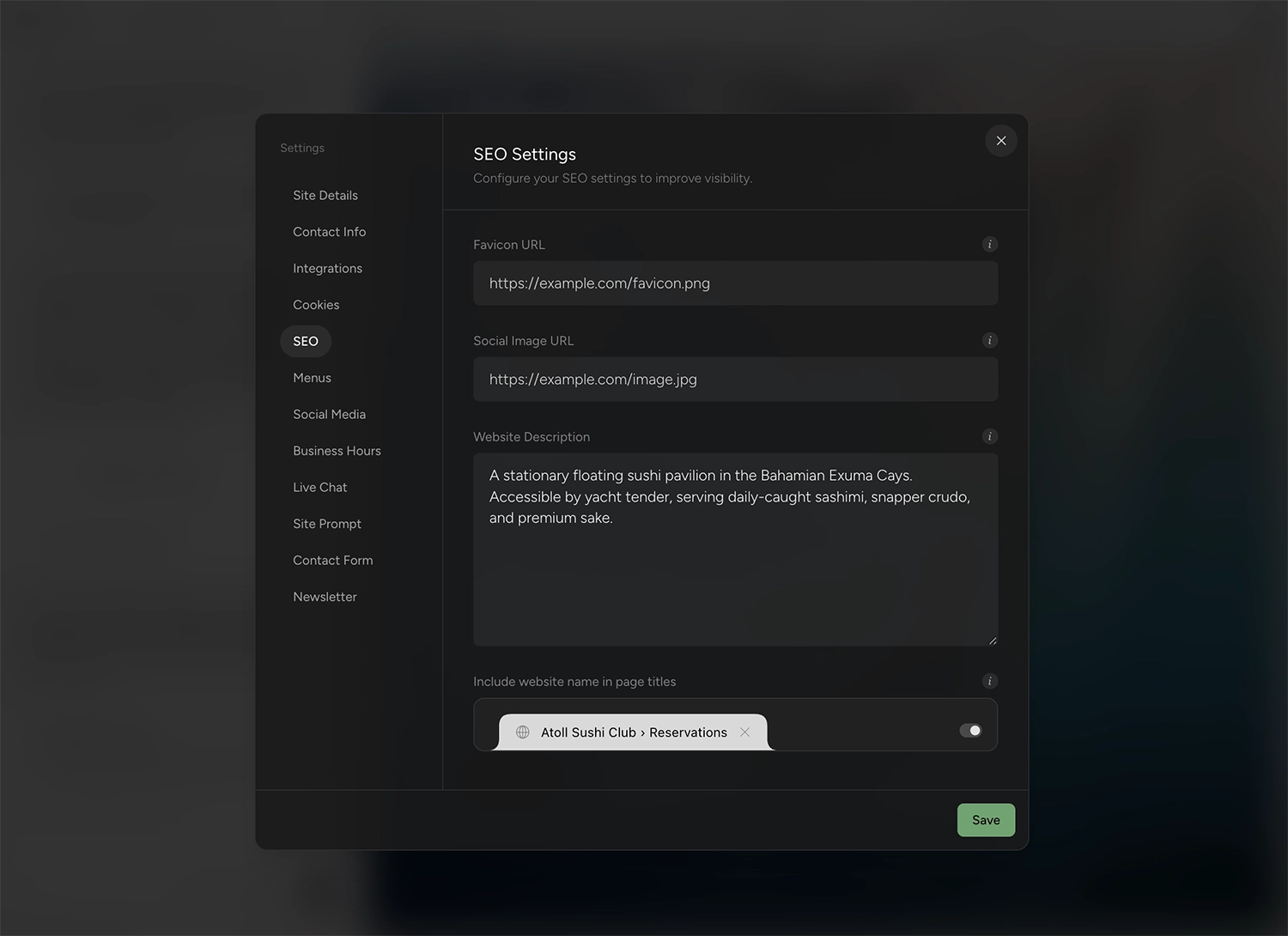
None of this is a plugin or a code change; it is a few fields and a submission.
What should you fix before publishing?
A few things are worth checking before you call it done, because AI-generated pages tend to share the same rough edges.
What AI-written pages usually get wrong
- Placeholder content. Sample headlines, lorem-ipsum body text, and stock claims slip through. Read every line and make it true.
- Fake images and broken links. Generated pages often reference images that do not exist or link to pages that were never built. Replace the images and fix or remove the links.
- Interactive bits that may not really work. In pasted code, a form, a cart, or a login is usually a mockup with no back end. A ChatGPT Site can include working forms and sign-in, so test them and check where submissions go, and OpenAI’s rules do not allow a Site to take payments, so a cart was never real. Rebuild these as real features rather than assuming they function.
- Inconsistent styling. One-shot code drifts between sections. Rebuilt into typed sections, the styling lines up, but give it a pass anyway.
None of this is a dealbreaker; it is the checklist that turns a demo into something you are comfortable putting your name on.
How do you publish it on your own domain?
You point your own domain at the site by updating one DNS record, so the address is yours instead of a temporary link. That record connects the www form of your domain, so if you want the bare domain to work too, forward it to www and keep one of them canonical.
Point your domain and publish
The short version is that you add a CNAME record at your domain provider that points the domain to your Outlyne site, then add the domain in Outlyne and publish. DNS changes can take a few minutes to a few hours to take effect, so it is normal for the switch not to feel instant.
The full walkthrough, including the exact record values, is in the custom domain guide.
So, is Outlyne right for your ChatGPT site?
Here is the short version. Outlyne is the right next step when the page ChatGPT made for you is meant to be a marketing site: pages that explain what you do and bring in inquiries. That is the job Outlyne’s AI is built for. It knows the strategies that make a site convert, whether the goal is captured leads, booked tables, or newsletter signups, and it will point at what to change on your pages and, with your go-ahead, make the changes for you.
It is not the right move for everything ChatGPT builds. If what you made is really a lightweight app, a dashboard, an internal tracker, or a tool behind a login, that is the territory ChatGPT Sites is aimed at, and Outlyne is not an app platform. And if you are a developer who wants to own the code, a vibe-coding tool that creates your site as code, or your own repository, will fit better than either.
A low-risk way to decide
You do not have to commit to find out. Get the page to a URL, paste it into Outlyne, and rebuild it while the original stays wherever it is. The free tier covers this, so you get a real look at the rebuilt site and the editing experience before paying anything. If it fits, you carry on; if it does not, you have lost nothing.
Frequently asked questions
- Is a website ChatGPT builds a real website?
- It can be live, but it is still a prototype in the way that matters. On an eligible paid plan, ChatGPT Sites can publish the page at a real URL; what you have is still a one-shot artifact you change by prompting the chat, not a site with sections you can keep editing. It is a strong starting point, not a finished site built for growth.
- Can I put a ChatGPT website online?
- Yes, two ways. On an eligible paid plan — Sites skips Free and Go — ChatGPT Sites publishes the page from inside ChatGPT, though it is a beta with usage limits and it is not available in the EEA, Switzerland, or the UK at launch. Otherwise you host the code yourself so it has a URL. The catch either way is editing: every change still means going back to the chat. Rebuilding the page into structured sections is what makes it a site you can actually maintain.
- Do I need a paid ChatGPT plan to get the site online?
- Only if you want ChatGPT to do the hosting: ChatGPT Sites is not available on the Free or Go plans, so publishing from inside ChatGPT starts at ChatGPT Plus, $20 a month. Outlyne’s free tier lets you rebuild the page and try the editor before paying anything, and Outlyne Pro is $20 a month, or $15 a month billed annually, with full website export, so your site and your data stay yours.
- Do I lose my work if I move off the ChatGPT code?
- You do not have to keep any of it, and you do not lose your work either. Outlyne reads the page you made and rebuilds it as editable sections, so the design and copy carry over while the fragile code does not. You keep the result, not the code.
- Can a ChatGPT-made website rank on Google?
- Yes. A page ChatGPT wrote can rank once it is live, hosted, and set up properly, but a fresh site has no history, so you are building rankings from zero. The SEO section below covers the titles, headings, and sitemap steps that get a new site found.
- How is this different from just using the ChatGPT code?
- That is exactly the trade. ChatGPT hands you a one-off page to babysit, and ChatGPT Sites hosts that page without changing how you edit it. Outlyne rebuilds it into named sections you change by describing what you want, with no code to touch and nothing that quietly breaks when you edit one part.