
Yes, you can turn a Bolt.new site into a real, editable website — publish the project and its live URL comes back as an editable site — and from there Outlyne works as your conversion coach, suggesting changes that turn more visitors into inquiries and making them for you once you give the go-ahead. Bolt is built to hand you a full working project, code included, which is more than a marketing site needs, so this guide covers what Bolt actually gives you, what it costs to keep editing through it, and how to trade the codebase for a site you can edit and get found with.
Can you turn a Bolt.new site into a real, editable website?
Yes, and you do not have to keep a codebase running to do it. If your Bolt site is published at a URL, Outlyne reads that live site the way a browser does and rebuilds it as a new, editable site. You paste the URL, and the page you pasted is ready to edit within minutes, with any other pages it read ready to build when you open them.
Publish the project so it has a URL
Bolt has built-in hosting: you click Publish and your project goes live on a free .bolt.host subdomain, or you can deploy through Netlify instead. That live URL is all the rebuild needs; you do not have to export the repo or share any code.
It rebuilds, it does not copy
This is a rebuild, not a clone. Outlyne is not importing Bolt’s generated code; the Outlyne importer loads the page the way a real browser does and recreates what a visitor sees, the layout, copy, and structure, as fresh, named sections. That is what makes the result editable afterward, and it is why your Bolt project can stay exactly as it is while you decide.
What do you actually get from Bolt?
Bolt is a vibe-coding tool: you describe what you want, and it creates your site as code. Naming what that code is clarifies everything after.
A full project, running in your browser
Bolt, built by StackBlitz, stands up a complete project, the framework, the files, the packages, sometimes a database, and runs it on WebContainers, a development environment that lives entirely in your browser tab, so there is nothing to install. It builds web apps and mobile apps as readily as websites, and it can wire in a database or payments as it goes. For prototyping an application, that is a lot of power in one place.
The code is yours, and that is the catch
Bolt does not lock you in. You can download the whole project as a zip or sync it to GitHub and keep building anywhere. But owning the code is exactly the deal: what Bolt hands you is a codebase, and a codebase assumes a developer and a workflow. For an app that is the right shape; for a marketing site it is scaffolding you did not need. A project answers can this run; an editable site answers can I change this without opening the code.
Why is a full Bolt project a burden for a marketing site?
This is where the tool outgrows the task.
A complete project is something you keep running
Bolt gives you a complete project, and a complete project is something you keep running: dependencies, builds, deploys, and someone who can read the code when the homepage needs a new line. That overhead is worth it for an app. For a marketing site it is weight with no payoff.
Bolt is built to stand up whole projects. A marketing site is the one case where that is more than you want.
Every edit draws down a token allowance
There is also a meter on it. Bolt prices by AI tokens: each prompt spends tokens from a monthly allowance, with the free plan at 1M tokens a month under a 300K daily cap and Bolt Pro at $25 a month for 10M. That model fits a build phase that ends. A marketing site is never done, so editing through the builder puts a running cost on routine copy changes, and editing the code directly brings you back to needing a developer.
What you actually wanted
That is the difference between a Bolt project and a site you run. The project is an app to maintain, with a metered AI to maintain it. What you wanted was a site you change by describing the change, with nothing to build, deploy, or top up in between.
How does Outlyne turn the Bolt site into editable sections?
Outlyne reads your published Bolt site and rebuilds the page you paste as a set of named sections the system understands: a hero, a features block, testimonials, a contact section, and so on. You can edit it as soon as it is done.
From generated code to typed sections
The running project becomes discrete, typed sections. Because Outlyne knows a hero is a hero and a testimonial is a testimonial, editing stays a normal act in the app, styling stays consistent across every page, and improvements to a section type roll out everywhere they are used. And instead of whatever styling the generator settled on, the site’s look becomes a custom design system you have full control over, so a restyle is a system change, not a hunt through the code.
The draft is the start, not the finish
The rebuild gives you a faithful draft, not a finished launch. Plan on a session with the Outlyne AI afterward: checking each page, tightening copy, swapping images, and having it coach each page toward more inquiries. You keep changing the site by describing what you want, the way you prompted Bolt, except there is no project to run and no code behind it to maintain.
How do you turn it into a real, editable website?
Hosting is the part Bolt already solved; your project can be live on a free .bolt.host URL today. Making it a real, editable website is the rest: shedding the project behind the pages, owning the address, and editing without a developer.
Hosting, your domain, and editing without a developer
- Hosting without the project. Rebuilt in Outlyne, the site is hosted for you as sections, with no build to rerun and no codebase behind the pages.
- Your own domain. Point your domain at it so the address is yours, not a generated subdomain. The steps are in the custom domain guide.
- Editing without a developer. Because the site is sections, changing copy, swapping an image, or adding a page is a normal edit, not a code change or another prompt against a token allowance.
That is the line between a generated project and a marketing site your team can run.
How do you set up SEO for a brand-new site?
A Bolt site is usually new and app-shaped, so the job is setting up SEO from zero so it can be found.
App-shaped output often skips SEO
A generated app tends to lead with structure and function, not the titles, descriptions, and clean headings search reads. Work through this once the site is live:
- Give every page a title and description. Generated projects often skip these; write one per page so search and answer engines know what the page is.
- Use one clear H1 and sensible H2s. Structure the headings for meaning, which generated app markup often does not.
- Replace placeholder content. Prototype copy and sample data slip through; search ranks the real words, so make them true.
- Publish a sitemap and submit it. Once the site is on your domain, submit its sitemap in Google Search Console so it gets crawled and indexed.
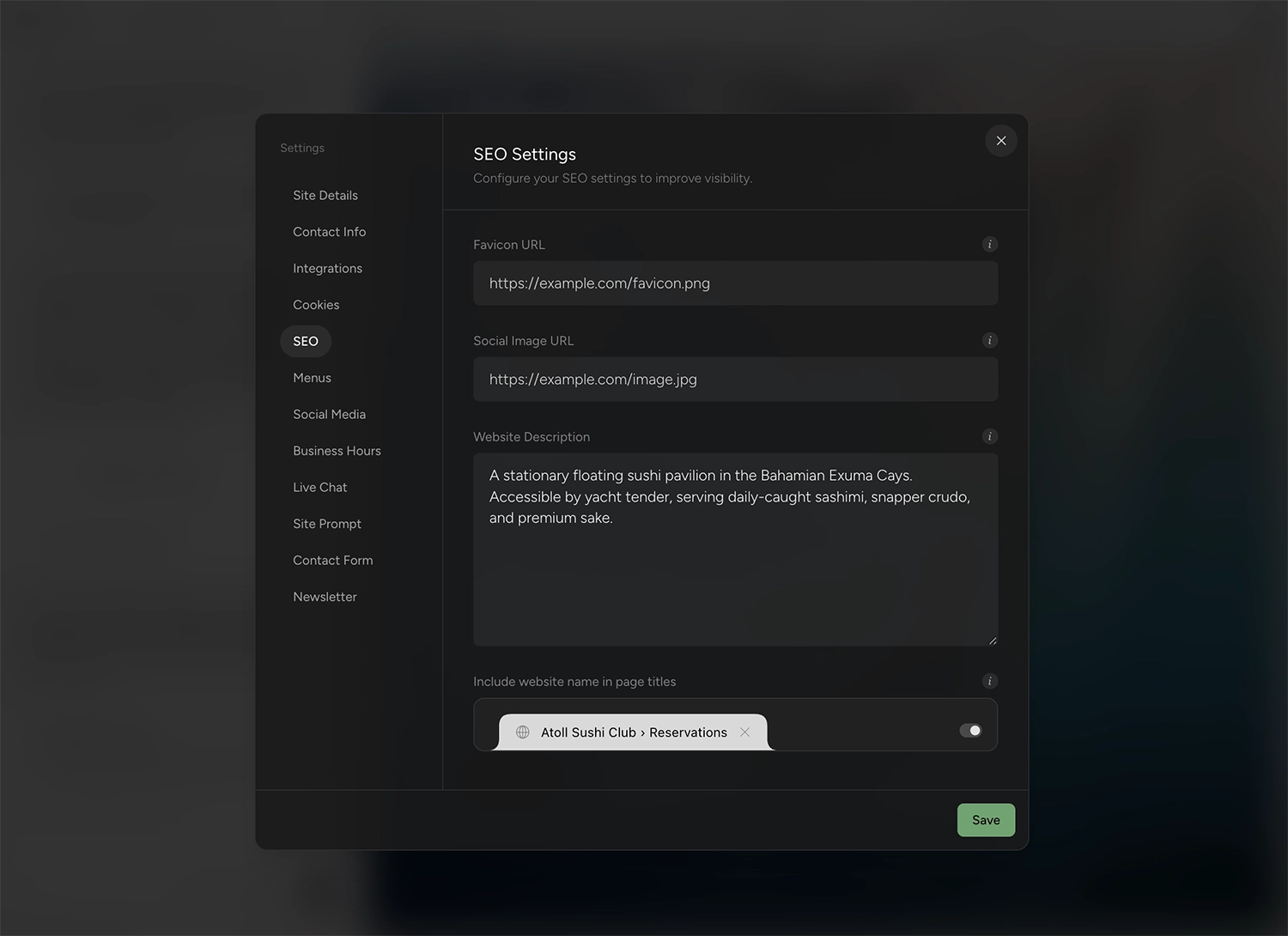
None of this is a code change; it is a few fields and a submission.
What should you fix before publishing?
A few things are worth checking before you publish, because a Bolt project brings app habits a marketing site does not need.
What a Bolt project usually needs trimmed
- App scaffolding. Routing, state, and boilerplate that made sense for a project are not needed in a marketing site; the rebuild keeps the design, not the plumbing.
- Half-built features. Generated forms, logins, or dashboards may be demo-grade: interface with nothing durable behind it, or a database you would now have to keep running. The rebuild recreates a contact or lead form as a working Outlyne form with its fields; logins, dashboards and anything else you plan to keep need rebuilding as real features.
- Placeholder content and data. Sample text and made-up numbers are common in a prototype. Replace them with the truth.
- Broken or missing assets. Generated projects sometimes reference images that do not exist. Swap in your own.
None of this blocks the move; it is the checklist that turns a prototype project into a site you are ready to publish.
How do you publish it on your own domain?
You point your own domain at the site by updating one DNS record, so the address is yours rather than a .bolt.host link. That record connects the www form of your domain, so if you want the bare domain to work too, forward it to www and keep one of them canonical.
Point your domain and publish
The short version is that you add a CNAME record at your domain provider that points the domain to your Outlyne site, then add the domain in Outlyne and publish. DNS changes can take a few minutes to a few hours to take effect.
The full walkthrough, including the exact record values, is in the custom domain guide.
So, is Outlyne right for your Bolt site?
Here is the short version. Outlyne is the right home for a Bolt project that was really a marketing site all along: pages that explain what you do and bring in inquiries. That is the job Outlyne’s AI is built for. It knows the strategies that make a site convert, whether the goal is captured leads, booked tables, or newsletter signups, and it will point at what to change on your pages and, with your go-ahead, make the changes for you. It is not the right move if what you built in Bolt is genuinely an app, with accounts, a database, or a dashboard people log into, or if you are a developer happy to own the codebase; those belong in Bolt or in your repo.
A low-risk way to decide
You do not have to commit to find out. Paste your published Bolt URL into Outlyne and rebuild a single page, your homepage is a good place to start, before you change anything else. You get a real look at the sections and the editing experience while the Bolt version stays live and untouched. If it fits, you carry on; if it does not, you have lost nothing, and the code is still yours.
Frequently asked questions
- Does Bolt build a real website?
- It builds a real, running project: code, packages, and a development environment in the browser, which it can publish to a live URL. That is impressive for prototyping an app, but for a marketing site it means you now own a codebase, when what you probably wanted was pages you can edit without one.
- Can I deploy the site Bolt made?
- Yes. Bolt has built-in hosting: you click Publish and the project goes live on a free bolt.host subdomain, with Netlify as an alternative and custom domains on Bolt’s paid plans. The question is upkeep, because once it is live, every content change is a code change or another prompt; rebuilding it into sections is what makes it a site you maintain without a developer.
- Do I lose my work if I move off the Bolt project?
- No. Outlyne reads your published Bolt site and rebuilds the design and copy as editable sections, so the look carries over without the codebase behind it. The Bolt project stays yours regardless: you can download the code or keep it synced to GitHub, so nothing is lost by moving.
- Can a Bolt site rank on Google?
- Yes, once it is live and set up for search. A generated project is app-shaped, so it often ships without the titles, meta descriptions, and heading structure search reads. The SEO section below covers setting those up for a new site.
- Why not just keep the Bolt project?
- Keep it if it is an app. For a marketing site, keeping the Bolt build means maintaining a codebase to change a paragraph, with every AI edit drawing down a token allowance. Outlyne rebuilds it into named sections you edit by describing changes, which is all a marketing site actually needs.
- How much does Outlyne cost compared to Bolt?
- For a site you keep editing, less. Bolt Pro is $25 a month for 10M tokens, and every prompt spends from that allowance, so ongoing edits have a running cost; the free plan is 1M tokens a month with a 300K daily cap, and a custom domain requires a paid plan. Outlyne Pro is $20 a month, or $15 a month billed annually, and the free tier lets you rebuild your site and try the editor before paying anything. Beyond price, Outlyne coaches your pages toward more inquiries, builds you a custom design system you have full control over, and supports full website export, so your site and your data stay yours.